How to use the spectrogram
Press Start mic and make a sound, or open an audio file. Time runs left to right, pitch goes up, and brighter means louder. Save PNG keeps the image.
- Pick a source. Start mic shows sound live; Open audio file (or drag a file onto the tool) draws the whole file at once.
- Choose a scale. Log suits most sounds, Linear shows high frequencies in detail, and Mel follows how we hear pitch.
- Choose colors. Fire and Ocean are easy to read on screen; Inverted grayscale prints well.
- Set the dB floor in Settings if quiet sounds don’t show or the background is noisy.
- Read values by pointing at the image, or with the Cursor time and Cursor frequency sliders.
- Save PNG for a report, with axes, a color bar and an optional caption.
No app is needed: the page works as a spectrogram viewer and generator in any current browser.
How an audio spectrogram works
This spectrogram online slices sound into short, overlapping windows, runs a fast Fourier transform (FFT) on each, and stacks the results side by side as columns. Each column shows how much energy every frequency had during that slice.
Window length trades time detail for frequency detail. At 48 kHz, an FFT of 2,048 samples gives frequency bins 23.4 Hz wide from a 42.7 ms slice; 8,192 samples give 5.86 Hz bins, but each slice lasts 171 ms, so quick sounds blur. Use small sizes for drums and speech timing, large ones for exact pitches.
Levels are converted to decibels and then to colors between the dB floor and the floor plus the range. The scale is set so a full-scale sine wave reads 0 dBFS, from the mic or a file. Frequencies can be spaced linearly, logarithmically (equal space per octave) or on the mel scale.
How to read a spectrogram
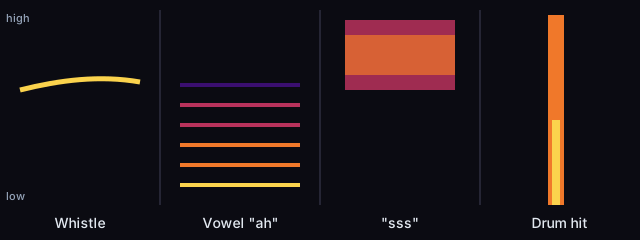
- A thin line is a pure tone: a whistle, a beep or an electrical whine. If it bends, the pitch changes.
- Stacked, evenly spaced lines are a voice or an instrument. The lowest line is the note you hear; the others are harmonics. In speech, bright regions in the stack (formants) shape the vowels.
- A broad band is noise: an “s” or “sh” sound sits high up, wind and fans spread wide.
- A vertical stripe is a short hit with energy at many frequencies at once: a click, a clap, a drum.
- Lines at 50 or 60 Hz and their multiples are mains hum from power wiring.
- Birdsong often shows as fast chirps sweeping up or down between about 1 and 8 kHz.
What people use spectrograms for
Birders and nature recordists document calls, because a spectrogram shows rhythm and pitch shape better than a waveform. Speech teachers and researchers look at vowels and consonants. Audio editors spot clicks, hum and background noise before they edit, and can see where a noise sits so they can remove it without touching the voice.
A spectrogram also shows whether a file marketed as lossless came from a lossy source: lossy encoders often remove the highest frequencies, which leaves a sharp horizontal cutoff across the whole track. Open the file with the Linear scale and the full range to look for one. To check a single moment in fine detail instead, use the spectrum analyzer. To trim a long recording before you open it, use the MP3 cutter.
Finding hidden images in audio
Some musicians and puzzle makers hide pictures in sound by drawing them into the frequencies. To find one, open the file, choose the Linear scale with the full frequency range, and set the FFT size to 4,096 or more. Then zoom into the part of the track where the image should be. Changing the colors and the dB floor often makes faint shapes stand out.
Spectrogram vs spectrum analyzer
A spectrogram shows how sound changes over time. A spectrum analyzer shows one moment in more detail, with exact peak frequencies. Use the spectrogram for speech, music and sounds that come and go, and the spectrum analyzer for a steady tone or hum. To see how a spectrogram draws a pitch, play a slow sweep from the tone generator near the microphone: it draws a rising line. To follow the pitch of your own voice, try the voice pitch analyzer.