How to use the white noise generator
- Turn your device volume down. Start low and raise it slowly to a comfortable level.
- Press Play. The white noise fades in over one second, so there’s no sudden blast.
- Raise Warmth if the hiss feels sharp. It softens the highs without making the sound quieter.
- Set a sleep timer from 15 minutes to 8 hours, and choose a 10, 20 or 30 second fade-out.
- Lock your phone or press ◐ Dim screen for a black screen. The sound keeps playing.
With the tool focused, Space or K plays and pauses, ↑ and ↓ change the volume, [ and ] change Warmth, D dims the screen and T steps through the timer.
What is white noise?
White noise is random sound with equal power at every frequency. It sounds like a steady “shhh”, similar to radio static. Because it covers the whole range at once, it can make changing sounds, such as voices or traffic, harder to pick out.
Equal power per hertz has a surprising result. Each octave spans twice as many hertz as the one below it, so it carries twice the energy. The top octave, from 10 to 20 kHz, holds as much energy as everything below it combined. That’s why white noise sounds bright and hissy.
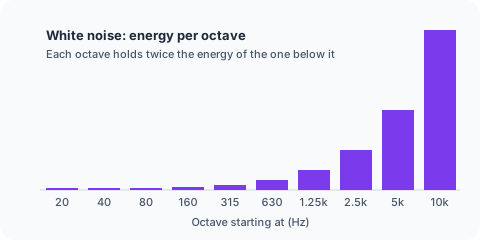
Radio hiss between stations and the static of old analog TVs come close to white noise. Rain and fans sound deeper, because more of their energy sits low.
How a white noise generator works
Your browser draws random numbers, 48,000 per second on most devices (44,100 on some), and sends them to the speaker. Whether the numbers follow a flat or a bell-shaped distribution, the result has the same flat spectrum. The highest frequency is half the sample rate, so this one covers 0 to 24,000 Hz.
The sound is generated live, not played from a file. There’s no loop to hear, no gap at the end, and no data use once the page has loaded.
Warmth adds a high-shelf filter above 2.5 kHz that turns the highs down by up to 18 dB. The tool raises the overall level to match, so you get soft white noise at the same loudness. Stereo sends different noise to each ear, which sounds wide in headphones; Mono sends the same noise to both, which sounds centered.
Use your phone as a white noise machine
- Plug the phone in and turn on Do Not Disturb.
- On an iPhone, check that the Ring/Silent switch isn’t set to silent.
- Open this page, press Play and set the volume.
- Set the sleep timer, then lock the screen.
On most phones the noise keeps playing with the screen locked, and the timer still fades out on time because it runs on the audio clock. A white noise website like this one works anywhere you have a browser, including a hotel room.
| This page | Dedicated machine | 10-hour video | |
|---|---|---|---|
| Endless sound | Yes | Yes | No, it ends |
| Tone control | Yes | Some models | No |
| Timer with fade-out | Yes | Some models | No |
| Audio ads | No | No | Possible on free accounts |
| Cost | Free | Paid | Free |
White noise for sleep: volume and timer tips
Many people use white noise to mask sounds that change, like traffic, voices or a partner’s snoring. A steady sound makes sudden ones less noticeable.
Keep it low. If you’d have to raise your voice to talk over the noise, it’s too loud. Put the phone or speaker across the room, not next to your ear. Use the timer if you only need sound while you fall asleep, and pick the longest fade-out so the change is gentle.
White noise for babies
Keep the sound quiet and the speaker well away from the crib, never inside it. Use the timer rather than playing it all night at a high level, and follow your pediatrician’s advice. This page can’t tell how loud the sound is in the room; a sound level meter app can give you a rough idea.
White noise too harsh? Try another color
If the hiss bothers you even with Warmth turned up, try pink noise, which has softer highs, brown noise, a deep rumble, or green noise, which is focused on the middle of the range. Many people grew up with fan noise in the bedroom. To blend colors yourself, use the noise generator.