How to use the brown noise generator
- Turn your device volume down. Start low and raise it slowly to a comfortable level.
- Press Play. The brown noise fades in over one second, so there’s no sudden blast.
- Set Depth. At 0 you hear classic brown noise. Slide right for a smoother, deeper rumble; the loudness stays about the same.
- Set a sleep timer from 15 minutes to 8 hours, and choose a 10, 20 or 30 second fade-out.
- Lock your phone or press ◐ Dim screen for a black screen. The sound keeps playing.
For the deepest settings, use headphones or a speaker with real bass. A phone speaker can’t play most of the sound.
With the tool focused, Space or K plays and pauses, ↑ and ↓ change the volume, [ and ] change Depth, D dims the screen and T steps through the timer.
What is brown noise?
Brown noise is random sound whose power falls by 6 dB per octave, twice as steeply as pink noise. Most of its energy sits in the low range, so it sounds like a deep, steady rumble with almost no hiss.
The name has nothing to do with the color. It comes from Brownian motion, the random jiggling of tiny particles in water that the botanist Robert Brown described in 1827. A signal that moves like that, a small random step at a time, is called a random walk, and its sound is brown noise. It’s also called red noise, by analogy with light that has extra energy at the long-wavelength end.
People compare brown noise to a distant waterfall, heavy rain on a roof or the hum inside an airplane cabin. Ocean surf heard from a distance is close too.
How the brown noise generator works
Your browser makes 48,000 random numbers per second on most devices. The generator adds each one, as a small step, to the previous value, then pulls the result slightly back toward zero. Without that pull, the signal would wander away from zero and clip.
The pull, called a leak, keeps the sound centered and makes it flat below about 150 Hz. Above that it falls 6 dB per octave. So the energy is packed into the bass: in classic brown noise from this page, half of it is below 150 Hz, 59% below 200 Hz, 81% below 500 Hz and 90% below 1 kHz.
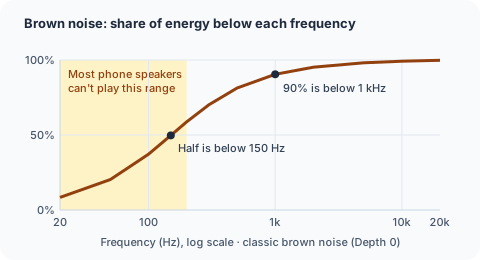
Depth adds a lowpass filter that moves from 20 kHz down to 150 Hz, removing more of the highs as you slide right. To keep the loudness steady, the tool adds up to 3 dB of gain at the deepest setting. Deep settings can still sound a little quieter, because ears are less sensitive to low frequencies; we don’t boost it further, to keep the level safe.
The “smoothed” and “super deep” brown noise videos on YouTube use the same idea, fixed in a recording. Here you set it yourself, and it never ends.
Brown noise vs white, pink and green noise
| Brown noise | White noise | Pink noise | Green noise | |
|---|---|---|---|---|
| Slope | −6 dB per octave | Flat | −3 dB per octave | Peak in the middle |
| Level at 100 Hz vs 10 kHz | +34 dB in our generator | 0 dB | +20 dB | Strongest near 500 Hz |
| Sounds like | Deep rumble, waterfall | Hiss, radio static | Steady rain | Fuller, softer middle |
| Pick it when | Low sounds bother you, like traffic or footsteps | You want to cover voices and other high sounds | You want a balanced middle ground | Bass and hiss both feel like too much |
White noise is the brightest; its top octave alone holds half its energy. Pink noise sits in the middle, with the same energy in every octave. Green noise is pink noise with the deep bass and the highs trimmed, so its energy gathers around 500 Hz.
Brown noise is the deepest of the common colors. If white noise sounds too sharp and pink noise still too bright, brown is the next step.
Getting a deep sound on phones, headphones and speakers
Phone and laptop speakers play little below about 100–200 Hz. A speaker that stops at 200 Hz misses roughly 60% of classic brown noise, and even more at high Depth. That’s why the page shows a hint from Depth 70.
- Headphones and earbuds play the full range. Earbuds need a good seal, or the bass leaks away.
- Bluetooth speakers may buzz or distort on deep bass. Lower the volume or the Depth; small speakers can only move so far.
- Not sure what your speaker can play? Run the subwoofer test to hear where its bass stops.
To turn a phone into a brown noise machine:
- Plug the phone in and turn on Do Not Disturb.
- On an iPhone, check that the Ring/Silent switch isn’t set to silent.
- Open this page, press Play and set the volume.
- Set the sleep timer, then lock the screen.
On most phones the noise keeps playing with the screen locked, and the timer still fades out on time.
Listening all night: volume and timer
Brown noise is a steady sound, and what it does is simple: it makes changing sounds less noticeable. Many people use brown noise for sleeping, to cover low sounds like traffic, footsteps upstairs or a neighbor’s TV.
Keep it quiet. If you’d have to raise your voice to talk over it, it’s too loud. Put the phone or speaker across the room, not next to your head. If you only need sound while you fall asleep, set the timer and pick the longest fade-out so the change is gentle.
We make no claims about what brown noise does for sleep, focus or health. If sleep is hard most nights, talk to a doctor.