How to use the binaural beats generator
- Put on headphones and press Check left and Check right. Each check sound should play in one ear only.
- Turn your device volume down, then press Play. The tones fade in at 25% volume.
- Pick a preset or set the Beat and Carrier yourself. The readout shows the exact frequency in each ear.
- Add background noise if you like: pink or brown noise, kept quieter than the tones.
- Set the sleep timer and fade-out, then lock your phone or press ◐ Dim screen.
With the tool focused, Space or K plays and pauses, [ and ] change the beat by 0.5 Hz, comma and period change the carrier by 10 Hz, 1 to 7 pick a preset, and L and R play the ear checks.
What are binaural beats?
Binaural beats come from two steady tones of slightly different pitch, one played to each ear. Your hearing system combines them, and you perceive a slow beat at the difference between them. A 200 Hz tone in the left ear and a 210 Hz tone in the right produce a 10 Hz binaural beat. “Binaural” simply means “two ears”.
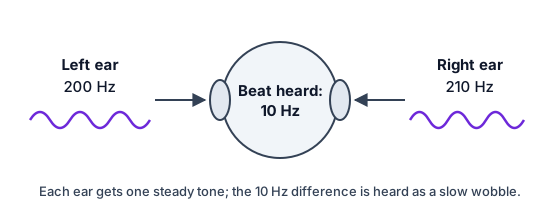
The beat is made inside your head, not in the sound. On speakers, both tones reach both ears and mix in the air first, so you hear an ordinary (monaural) beat, a pulsing you could record with a microphone. That’s why binaural beats need headphones.
How this binaural beats generator works
This binaural beats generator plays two pure sine waves and nothing else: the carrier in your left ear and the carrier plus the beat in your right. You can set the carrier from 100 to 500 Hz and the beat from 1 to 40 Hz in steps of 0.1 Hz. Changes glide smoothly, so there are no clicks.
The optional background noise comes from the same engine as the site’s noise generators and always stays at least 6 dB quieter than the tones. Nothing on the page flashes or pulses at the beat rate. To play other combinations of tones, such as the same pair on speakers, use the tone generator.
Beat frequencies and the labels you’ll see online
| Preset | What it sounds like | Label often used online |
|---|---|---|
| 2 Hz | A slow pulse, two per second | Delta (1–4 Hz) |
| 4 Hz, 6 Hz | A slow to medium wobble | Theta (4–8 Hz) |
| 10 Hz | A fast wobble | Alpha (8–13 Hz) |
| 16 Hz, 25 Hz | A flutter | Beta (13–30 Hz) |
| 40 Hz | A rough buzz | Gamma (30 Hz and up) |
The Greek-letter names come from EEG recordings, where they describe rhythms measured in brain activity. Playing a beat at one of those rates doesn’t put your brain into that state, and studies disagree about whether it changes anything at all. Many people play binaural beats while studying or winding down simply because they like the sound.
Do binaural beats work? What research says
What’s well established is the perception: most people with normal hearing in both ears clearly hear a binaural beat, especially at slower rates and lower carriers. What’s debated is everything beyond that, such as claims about focus, relaxation, mood or sleep.
Researchers have tested whether brain activity follows the beat (called entrainment) with mixed results: some studies report effects, others find none, and methods vary a lot. A systematic review published in 2023 found the evidence for entrainment inconsistent. This page doesn’t promise any effect. If you enjoy the sound, use it; if it does nothing for you, that’s a common experience too.
Getting a clear binaural beat
- Use wired headphones, or good Bluetooth headphones not in hands-free (call) mode. Close apps that use the microphone.
- Turn off Mono Audio in your phone’s accessibility settings, and turn off spatial audio or head tracking for this page.
- Run the ear checks; if the sides are swapped, the left and right check helps find where.
- Slower beats, under about 30 Hz, are easier to hear as a beat; a lower carrier makes them clearer.
- Video uploads and some streaming codecs blur the separate channels. Here the tones are generated live, so nothing is compressed.
For a fuller check of your headphones, run the headphone test. For a steady sound without tones, try pink noise.
Comfort and safety
Keep the volume low: you should be able to talk over it easily. Take breaks, and stop if the sound feels unpleasant or tiring. Don’t listen while driving or doing anything that needs your full attention. If you have epilepsy or another medical condition and aren’t sure whether this is right for you, ask your doctor first. This page makes no health claims.