How to use the pink noise generator
- Turn your device volume down. Start low and raise it slowly to a comfortable level.
- Press Play. The pink noise fades in over one second, so there’s no sudden blast.
- Adjust Depth. Slide left for a brighter, airier sound; right for a deeper, softer one. The loudness stays the same.
- Set a sleep timer from 15 minutes to 8 hours, and choose a 10, 20 or 30 second fade-out.
- Lock your phone or press ◐ Dim screen for a black screen. The sound keeps playing.
To check speaker levels instead, switch the mode to Speaker check; the steps are below.
With the tool focused, Space or K plays and pauses, ↑ and ↓ change the volume, [ and ] change Depth, D dims the screen and T steps through the timer. In Speaker check, B, L and R pick the channel.
What is pink noise?
Pink noise is random sound whose power falls by 3 dB per octave, a 1/f spectrum, so every octave carries the same energy. The range of hearing, 20 Hz to 20 kHz, spans about ten octaves, so each one holds about 10% of the energy. Pink noise sounds softer than white noise, and people often compare it to steady rain or wind.
Equal energy per octave matches the way we hear pitch. The step from 100 to 200 Hz sounds about as big as the step from 1,000 to 2,000 Hz, even though the second one spans ten times as many hertz. That’s why pink noise sounds balanced to most people, while white noise, whose top octave alone holds half the energy, sounds bright.
The name is an analogy with light: light with extra energy at the long, red end of the spectrum looks pinkish, and this noise has extra energy at the low end compared with white noise.
Pink noise vs white noise vs brown noise
The common noise colors differ in one thing: how fast the power falls as the frequency rises.
| White noise | Pink noise | Brown noise | |
|---|---|---|---|
| Slope | Flat (0 dB per octave) | −3 dB per octave | −6 dB per octave |
| Energy | Equal per hertz | Equal per octave | Mostly in the lows |
| Level at 100 Hz vs 10 kHz | 0 dB | +20 dB | +34 dB in our generator |
| Sounds like | Hiss, radio static | Steady rain, wind | Deep rumble |
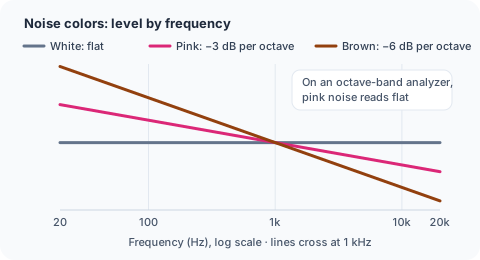
White noise is the brightest of the three, and some people find its hiss sharp. Brown noise is the deepest: a low rumble with almost no hiss. Pink noise sits between them, which is why it’s often the first one people try.
If you can’t decide, play each one for a minute at the same volume and keep the one you notice least. The Depth slider here also lets you move from pink toward brown without switching pages.
How this pink noise generator works
Pink noise starts as white noise: random numbers at your device’s sample rate, usually 48,000 per second. A filter then tilts the spectrum down by 3 dB per octave. This page uses Paul Kellet’s refined filter, which adds up seven weighted first-order filters. It stays within ±0.05 dB of the ideal slope above 9.2 Hz, and our output measures −3.02 dB per octave between 200 Hz and 8 kHz.
The noise is generated live in your browser. There’s no recording, no loop to hear, no gap at the end and no data use once the page has loaded. Stereo plays different noise in each ear, which sounds wide in headphones; Mono plays the same noise in both.
Depth blends in a separate brown noise source while keeping the total loudness the same. At 0 you hear pure pink noise. At 100, pink and brown play at equal power, a darker sound some people call deep pink noise.
Using pink noise to test speakers
Pink noise is a standard test signal for speakers because it reads flat on an analyzer with octave or 1/3-octave bands. That makes it easy to compare two speakers or to see what an EQ setting changes.
To match the levels of two speakers:
- Switch the mode to Speaker check.
- Pick Left, so only one speaker plays.
- Choose the 500–2,000 Hz band. It leaves out the deep bass that your room exaggerates and the highs that change when you move your head.
- Turn your system volume down, then press Set −20 dBFS reference and confirm.
- Hold a sound level meter, or a meter app, at ear height in your listening seat.
- Raise the system volume to a comfortable level and note the reading.
- Pick Right and adjust that speaker’s level on your amplifier or receiver until the readings match.
Many AV receivers have their own test tone and level setup for this. Check your receiver’s manual for the reference level it expects. In a car, use the same steps with the balance and fader controls, and read the meter at the driver’s head.
Know the limits. A browser can’t measure loudness in dB SPL: the page knows its digital level (−18 dBFS RMS at full volume), not how loud your speakers play. Meter apps differ between phones, so use the same meter for every speaker.
For a left/right check, use the speaker test. Band-limited noise stops below 500 Hz, so for bass use the subwoofer test.
Pink noise and sleep: what we can say
Researchers have studied pink noise during sleep, but the studies are small and the results are mixed. Health sites disagree in tone, and we make no claims about what pink noise does for sleep, memory or health.
What we can say is that many people prefer pink noise to white noise because it sounds softer, and they use it to cover changing sounds at night. If you do, keep the volume low enough that you could talk over it, put the speaker across the room, and use the timer with a fade-out if you only need sound while you fall asleep. If sleep is hard most nights, talk to a doctor.