Skip to content

Search tools

Noise Generator

Press Play for endless noise in six colors. Start with a preset, blend the colors with the sliders, and set a sleep timer that fades out gently.

  • Updated
  • Runs on your device

This tool can't run in this browser

Web Audio isn't available here. Open this page in a current version of Chrome, Edge, Firefox or Safari.

Noise couldn't start

Both sound engines failed in this browser. Reload the page and press Play again.

Start with your device volume low, then raise it.

0%
80%
40%
0%
0%
0%
25%

Paused

Spectrum

Press Play to see the spectrum.

The plot shows the generated sound, not what your speakers play.

Runs in your browser · Nothing is uploaded · Free

How to use the noise generator

  1. Turn your device volume down, then press Play. The noise fades in over one second.
  2. Pick a preset or move the color sliders. Balanced mixes pink and brown noise; Deep leans on brown; Bright adds white, blue and a little violet. Any change glides in, with no clicks.
  3. Open Spectrum to see the mix. The readout shows the measured slope, such as “−3.0 dB per octave · pink-like”.
  4. Set a sleep timer from 15 minutes to 8 hours, with a 10, 20 or 30 second fade-out.
  5. Lock your phone or press ◐ Dim screen. The noise keeps playing.
  6. Copy the link to share your mix. It keeps the color levels, never the volume.

With the tool focused, Space or K plays and pauses, ↑ and ↓ change the volume, D dims the screen and T steps through the timer.

Noise colors explained
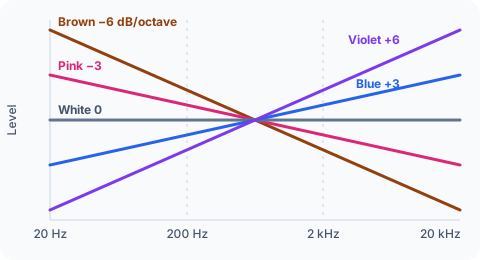
Diagram: noise colors as lines of different slopes, from brown falling steeply to violet rising

Noise colors describe how the sound’s energy is spread from low to high frequencies. The slope is measured in decibels per octave.

Color Slope Often compared to Common use Page
White 0 dB per octave TV static, a hiss Masking voices white noise
Pink −3 dB per octave Steady rain Sleep, speaker checks pink noise generator
Brown −6 dB per octave A distant waterfall, a deep rumble Masking low sounds brown noise generator
Green A bump near 500 Hz Wind, the middle of the range Background sound green noise
Blue +3 dB per octave A hiss with more sparkle Audio tests —
Violet +6 dB per octave A very bright hiss Dithering, tests —

White noise has equal energy at every frequency, so the top octave, 10 to 20 kHz, holds as much energy as everything below it. That’s why it sounds hissy. Pink noise gives each octave the same energy instead: across 20 Hz to 20 kHz, each of the 10 octaves carries about 10% of the total.

Brown noise is named after the botanist Robert Brown and the random motion he described, not after the color. Green noise has no single standard; here it’s pink noise focused around 500 Hz. Blue and violet noise mostly serve audio work such as dithering and tests.

How the noise generator works

An audio noise generator makes random numbers at the sample rate of your device, usually 44,100 or 48,000 per second. That stream is white noise. Filters shape it into the other colors: they soften the highs for pink and brown, or lift them for blue and violet.

This page generates the noise live, in a small audio program that runs beside the page. Nothing repeats, so there’s no loop to hear, and no data is used after the page has loaded. If your browser can’t run that program, the page falls back to a 10-second loop with a smooth seam.

The spectrum view shows the generated signal, not what your speakers play. Phone and laptop speakers roll off below about 100 to 200 Hz, so brown noise sounds thinner on them than on headphones. To see what a microphone picks up instead, use the spectrum analyzer.

Using a noise generator for sleep or focus

Many people use steady noise to mask sounds that change, such as traffic, voices or a door slamming down the hall. A constant sound makes sudden ones less noticeable, which is why fans and air conditioners have long been popular at night.

Keep the level low. If you’d have to raise your voice to talk over the noise, it’s too loud. For sleep, put the phone or speaker across the room rather than next to your head, and use the timer if you only need sound while you fall asleep.

For work or study, try a mix with less hiss, such as Balanced or Deep, and wear headphones in a shared space. Results vary from person to person, so trust your own comfort over any rule. If the sound seems wrong on one side, check your speakers with the speaker test.

Playing noise on a phone

Open the page, press Play, then lock the screen. On most phones the noise keeps playing, and the timer still fades it out on time because it runs on the audio clock rather than on page timers.

On an iPhone, check the Ring/Silent switch if you hear nothing, and close other apps that play audio. Some phones close background tabs when memory or battery runs low, so plug the phone in for a full night.

Battery use is small but real: a phone has to keep its audio hardware awake. Lowering the screen brightness, or using ◐ Dim screen, saves more power than anything else you can do on this page.

All noise & sleep sounds

  • White Noise Generator

    Endless white noise with volume, tone (warmth) control, sleep timer with fade-out and screen-off playback.

  • Pink Noise Generator

    Pink noise (1/f) with the same sleep-timer/background features plus a short explainer of how pink differs from white and brown.

  • Brown Noise Generator

    Deep brown (red/Brownian) noise with depth control, a sleep timer with fade-out and background playback.

  • Binaural Beats Generator

    Two slightly different tones in each ear (headphones) with preset beat frequencies, carrier control and optional background noise.

  • Fan Noise

    Synthesized fan sounds (box fan, desk fan, ceiling fan, AC) with speed and hum controls and sleep timer.

  • Green Noise Generator

    Mid-frequency 'green' noise (band-emphasized around 500 Hz) with sleep timer and background playback.

Which noise do I need?

Which noise do I need?
If you…TryWhy
hear voices, a TV or office chatterWhite Noise GeneratorEven energy across the range, speech included
find white noise too hissyPink Noise GeneratorSofter highs (−3 dB per octave)
are bothered by traffic, footsteps or a neighbor's bassBrown Noise GeneratorMost energy in the low range
want fuller than pink, less muffled than brownGreen Noise GeneratorFocused near 500 Hz
usually sleep with a fan or AC runningFan NoiseAirflow with speed and motor hum
have headphones and want to try binaural beatsBinaural Beats GeneratorA different tone in each ear
want your own blendThe mixer aboveOne slider per color
want to check speakers with noisePink Noise GeneratorPink noise is the usual level-check signal

Frequently asked questions

What is a noise generator used for?

Many people use a noise generator to mask sounds that come and go, such as traffic, voices or a snoring partner, while they sleep, work or study. Offices use it for speech privacy, audio engineers use pink noise to check speakers and set levels, and sound designers use noise as raw material.

How do you generate noise?

White noise is a stream of random numbers, one per sample, played at the audio sample rate. Filters then shape it into other colors: softening the highs gives pink or brown noise, boosting them gives blue or violet. Hardware noise generators amplify the random electrical noise of a transistor or diode instead.

Which noise color should I use for sleep?

It comes down to preference. Many people start with pink or brown noise because they sound softer than white noise, which can seem hissy. Try each color for a minute at a low volume, then keep the one you notice least. The Deep and Balanced presets are good starting points.

What frequency is the noise?

Noise has no single frequency. It contains every frequency at once, from a few hertz up to half the sample rate: 22,050 Hz at 44.1 kHz or 24,000 Hz at 48 kHz. The color describes how the energy is spread across that range, which the spectrum view shows as a slope.

Does the noise generator work on iPhone?

Yes, in Safari 17 or later and other current iPhone browsers. Tap Play and raise the volume slowly. If you hear nothing, check that the Ring/Silent switch isn't set to silent and that another app isn't using the audio. Behavior with the screen locked can vary between iOS versions.

Can the noise keep playing in the background?

Yes. Once you press Play, the noise keeps going when you switch tabs or lock the screen on most devices. The sleep timer runs on the audio clock, so it fades out on time even in a background tab. The system can still close a tab to save memory or battery.

What is the best noise generator app?

Look for endless sound with no loop gaps, a fade-out timer, background play and no sign-up. This page has all four and runs in your browser, so there's nothing to install. A native app makes more sense if you want to play noise offline, without opening a browser.

Written and tested by Tanveer Azam Ansari.

Each tool is checked on real speakers, headphones and microphones in current browsers. How we test

Updated Report a problem