How to use the banjo tuner
- Press Start tuner and choose Allow when the browser asks for the microphone.
- Pick one string near the neck end of the head, and let it ring.
- Follow the arrow. “↑ Tune up” means tighten, “↓ Tune down” means loosen. Each string gets a ✓ after half a second in tune.
- Pick again if the note dies. Banjo notes fade quickly. The tuner holds the last reading for 2 seconds, then asks you to pick again.
- If the tuner mixes up the two G or two D strings, tap the string you’re tuning to lock it. Press 0 or tap it again to go back to automatic.
No microphone access? Choose Tune by ear and tap a string to hear its note, or press Play all.
5-string banjo tunings
A 5-string banjo has four full-length strings and a short 5th string that starts at the 5th fret. The 5th string is a high drone: you play it open, mostly with your thumb, and it rings over the melody.
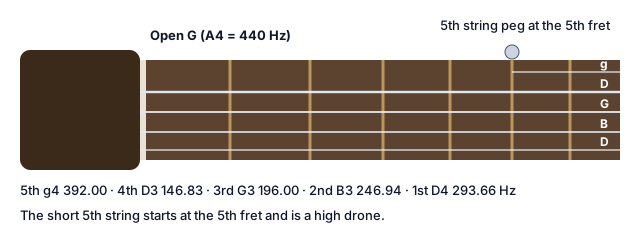
Open G is the standard tuning: g D G B D, from the 5th string to the 1st, at 392.00, 146.83, 196.00, 246.94 and 293.66 Hz. Players write the 5th string as a small g because it’s higher than the 3rd string’s G.
Old-time players retune for different keys. When you switch tunings, the tuner lists the strings that move and marks them until they’re in tune again.
| Tuning | Strings 5 to 1 | Change from Open G |
|---|---|---|
| Double C | g C G C D | 4th string down a whole step, 2nd string up a half step |
| C tuning (Drop C) | g C G B D | 4th string down a whole step |
| G modal (Sawmill) | g D G C D | 2nd string up a half step |
| Open D | f♯ D F♯ A D | 5th and 3rd strings down a half step, 2nd string down a whole step |
How the banjo tuner works
This online banjo tuner listens through your microphone, takes about 20 measurements a second and compares each note with the strings of the tuning you chose.
Open G holds two pairs of notes an octave apart: the 3rd string’s G3 and the 5th string’s g4, and the 4th string’s D3 and the 1st string’s D4. A low string can sound so strongly at its second harmonic that a tuner mistakes it for the higher string. An octave check looks for the energy only the lower string has, so the tuner can tell the 3rd and 5th strings apart.
Banjo notes fade fast, so the tuner holds the last reading for 2 seconds and ignores the first moment of the pick’s attack. Clip-on tuners sense vibration through the headstock and ignore the noise at a jam. A microphone tuner needs a quieter room.
Tuning with a capo and the 5th string
A capo raises every fretted string. With a capo at the 2nd fret, Open G becomes Open A: a E A C♯ E. The 5th string doesn’t reach the capo, so raise it by the same number of frets: with a 5th-string capo, or with the small railroad spikes many banjos have in the fingerboard, often at the 7th, 9th and 10th frets.
Set Capo to the capo’s fret and choose whether the 5th string is raised too or left open. The strings then show the notes that sound with the capo on, and the [ and ] keys move the capo down or up.
Tenor, Irish tenor and plectrum banjos
Four-string banjos have no short 5th string:
- Tenor banjo: C G D A, tuned in fifths like a viola. Common in Dixieland and early jazz.
- Irish tenor: G D A E, an octave below a fiddle. If you also play fiddle, the fingering carries over.
- Plectrum banjo: C G B D, the same as a 5-string’s C tuning without the 5th string.
Choose 4-string to see these presets.
Tuning by ear
Tune one string to a reference tone, then tune the others to it. In Open G:
- Press the 4th string at the 5th fret: that’s G, the open 3rd string.
- Press the 3rd string at the 4th fret: that’s B, the open 2nd string.
- Press the 2nd string at the 3rd fret: that’s D, the open 1st string.
- Press the 1st string at the 5th fret: that’s g, the open 5th string.
In By ear mode, tap a string to hear it for 2.5 seconds, or press Play all to hear all five from the 5th string to the 1st.
Why your banjo keeps going out of tune
New strings stretch for the first few days. Re-tune often, and gently pull each string away from the head a few times after fitting it.
Pegs. Geared pegs have a small screw in the end of each button that sets the friction. If a peg turns too easily or slips back, tighten that screw a little.
The head. A banjo’s head is a drum, and its tension changes the pitch. A natural skin head reacts to humidity far more than a synthetic one, so a banjo with a skin head can go out of tune between a dry room and a damp one.
The bridge isn’t glued. String pressure holds it, so it can shift during string changes. Change one string at a time, and use the Bridge check: it compares the 12th-fret harmonic with the fretted note and tells you which way to move the bridge.
Keep the banjo in its case away from heaters and sunny windows, and let it settle in a new room for a few minutes before tuning.
Banjo tuning pegs and clip-on tuners
“Banjo tuners” can mean two things.
Tuning pegs: most modern banjos have geared planetary pegs that point straight back from the headstock and turn smoothly through a small gear inside. Some vintage banjos have friction pegs. The 5th string’s peg sits on the side of the neck at the 5th fret.
Electronic tuners: clip-on tuners attach to the headstock and read vibration, which makes them good for jams. This page is the free alternative that uses your microphone.
For other instruments and tunings, use the chromatic online tuner. A banjo often shares the stage with a mandolin, which has its own tuner.