How to use the violin tuner
- Press Start tuner and choose Allow when the browser asks for the microphone.
- Tune the A string first. Bow a long, even note with steady pressure, or pluck it. The A chip is marked “1st”.
- Follow the arrow and the coach. “↑ Tune up” means tighten, “↓ Tune down” means loosen. The line under the needle says whether to use the fine tuner or the peg.
- Then tune D, G and E, in the order on the chips. Each string gets a ✓ after half a second in tune.
- Stop at once if a red warning appears. It means the string is well above its note, and a thin E string can snap.
Tap a chip to lock the tuner to that string, which helps when a string is far off. With the tuner focused, keys 1 to 4 lock G, D, A and E, and 0 goes back to automatic.
Violin string notes and frequencies
Hold the violin in front of you with the scroll at the top. From left to right the strings are G, D, A and E, from the thickest and lowest to the thinnest and highest.
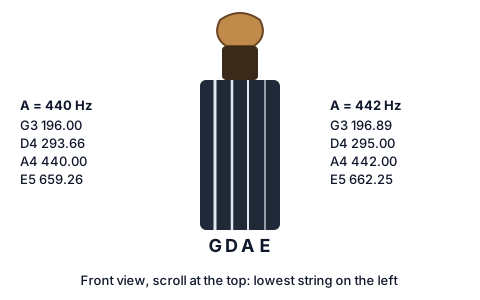
| String | Note | A = 440 Hz | A = 442 Hz |
|---|---|---|---|
| 4th (lowest) | G3 | 196.00 Hz | 196.89 Hz |
| 3rd | D4 | 293.66 Hz | 295.00 Hz |
| 2nd | A4 | 440.00 Hz | 442.00 Hz |
| 1st (highest) | E5 | 659.26 Hz | 662.25 Hz |
Every size of violin, from 1/16 to full size (4/4), uses the same four notes. A smaller violin just has shorter strings.
Pegs or fine tuners: which to use
Pegs are for big changes: a new string, or one that’s a semitone or more off. Turn the peg slowly and push it gently into the pegbox as you turn, so the taper grips and the peg doesn’t slip back. Small movements matter, so turn a few degrees at a time and pluck again.
Fine tuners are the small screws on the tailpiece. They’re for the last few cents. Turning one clockwise raises the note, and counterclockwise lowers it. Most violins have one on the E string. Many student violins have four.
Set “Fine tuners on” to match your violin, and the coach under the needle will pick the right one. It suggests the fine tuner for errors up to 30 cents. That’s a rule of thumb: most fine tuners only have a small range.
When a fine tuner is screwed nearly all the way in, it has no room left and can scratch the top of the violin. Back it out to the middle, then bring the string back to pitch with the peg.
Tuning to A = 440 or 442 Hz
A = 440 Hz is the international standard pitch (ISO 16), and it’s the default here. Many orchestras tune a little higher, at 442 or 443 Hz, usually to the oboe’s A. Baroque ensembles often use 415 Hz. Follow your group: press the 441, 442 or 443 chip, or set any value from 415 to 466 Hz in the A4 box.
If you need to hear the A before a rehearsal, switch to By ear and tap the A chip for a 30-second drone, or play a steady 440 Hz tone from the tone generator.
Tuning by fifths and the pure fifths setting
Violinists often tune A first, then bow two strings at once (A and D, D and G, A and E) and turn until the sound is smooth. A mistuned fifth wobbles: you hear a beat. When the beating stops, the fifth is pure.
A pure fifth is about 2 cents wider than the fifths on a piano or an equal-tempered tuner. So after tuning by ear from A, your E ends up about 2 cents higher than an ordinary tuner expects, D about 2 cents lower and G about 4 cents lower.
| String | Equal-tempered | Pure fifths from A |
|---|---|---|
| E5 | 659.26 Hz | 660.00 Hz (+2 cents) |
| A4 | 440.00 Hz | 440.00 Hz |
| D4 | 293.66 Hz | 293.33 Hz (−2 cents) |
| G3 | 196.00 Hz | 195.56 Hz (−4 cents) |
Choose Pure when your teacher tunes by ear and you want the tuner to agree. Choose Equal-tempered when you play with a piano or a keyboard. In By ear mode, the Fifths helper drones one string while you bow the next, so you can practice hearing the beats slow down and stop.
Tuning a viola and fiddle cross-tunings
A viola is tuned C G D A, a fifth below the violin. It shares three strings with the violin (G, D and A), so pick Viola and tune A first, as usual. The C string is 130.81 Hz. A cello uses the same notes an octave lower: use the cello tuner for it.
Old-time and folk fiddlers retune for some tunes:
- AEAE: raise the G and D strings by a whole step to A and E.
- ADAE: raise only the G string to A.
- GDGD: lower the A and E strings by a whole step to G and D.
Raise strings slowly and in small steps, and tune back to standard after the set. The tuner keeps the same coach and order badges for each.
Why your violin won’t stay in tune
Slipping pegs. A peg that doesn’t hold usually needs pushing in as you turn. If it still slips, peg compound helps, or a luthier can refit it. A peg that sticks and jumps needs the same care.
Dry and humid seasons. Wood and gut-core strings react to the air. Pegs shrink in dry winter air and slip, and they swell in summer and stick. Let the violin settle in the room for 10 minutes before tuning.
New strings settle for several days. Re-tune often in the first week.
Fine tuners at the end of their range. Reset them to the middle and correct with the peg.
The bridge. Tuning up pulls the top of the bridge toward the fingerboard. After tuning, look at it from the side: it should stand straight. If it leans, ask a teacher or luthier to straighten it, because a leaning bridge can fall or warp.
For other string instruments, or any single note, use the chromatic online tuner.